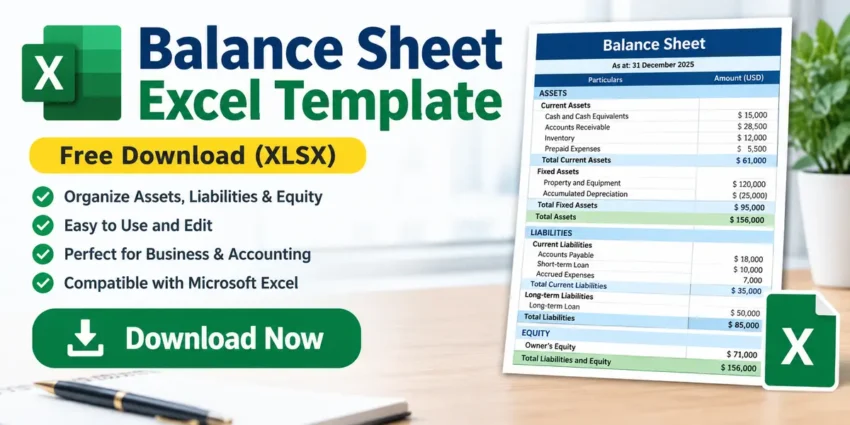
Managing financial information can be much easier when you have a properly organized spreadsheet. If you are looking for a simple and practical Balance Sheet Excel Template, this free XLSX template can help you organize important financial information in Microsoft Excel.
A balance sheet is an important financial statement used to understand the financial position of a business or organization. It generally organizes information about assets, liabilities, and equity in a structured format.
This free Balance Sheet Excel Template is useful for small businesses, organizations, accountants, students, and anyone who wants to maintain financial information using Excel.
Download Balance Sheet Excel Template
File Name: balance-sheet.xlsx
File Format: .xlsx
Software Required: Microsoft Excel or a compatible spreadsheet application
What Is a Balance Sheet?
A balance sheet is a financial statement that provides a snapshot of a business’s financial position at a particular point in time.
It generally includes three major areas:
- Assets
- Liabilities
- Equity
The basic accounting relationship is:
Assets = Liabilities + Equity
By organizing these figures properly, a business can get a clearer picture of its financial position.
What’s Included in This Excel Template?
This Balance Sheet Excel Template is designed to help organize financial information in a structured spreadsheet.
Depending on your accounting requirements, you can use the template to record and organize information such as:
Assets
Assets represent resources owned or controlled by a business.
Examples include:
- Cash
- Bank balance
- Accounts receivable
- Inventory
- Equipment
- Furniture
- Vehicles
- Property
- Other business assets
Current Assets
Current assets are generally assets that are expected to be converted into cash or used within a relatively short period.
Examples include:
- Cash
- Bank deposits
- Accounts receivable
- Inventory
- Short-term investments
- Prepaid expenses
Fixed Assets
The spreadsheet can also be useful for organizing long-term assets such as:
- Land
- Buildings
- Machinery
- Furniture
- Equipment
- Vehicles
- Computers
Why Use a Balance Sheet Excel Template?
Creating a balance sheet from scratch can take time, particularly if you regularly prepare financial reports.
An Excel template provides a structured starting point and can help you:
- Save time
- Organize financial data
- Reduce manual formatting
- Maintain consistent reports
- Review assets and liabilities
- Prepare financial information more easily
- Customize the spreadsheet according to your requirements
Because the file is provided in XLSX format, you can open and edit it using Microsoft Excel and other compatible spreadsheet applications.
Who Can Use This Template?
This template can be useful for a variety of users.
Small Businesses
Small business owners can use the spreadsheet to organize financial information and prepare a basic balance sheet.
Accountants
Accountants and accounting professionals can use an Excel template as a starting point for financial reporting.
Organizations
Organizations and offices can customize the template according to their accounting requirements.
Students
Accounting and business students can use the template for learning and practicing balance sheet preparation.
Personal Finance
Individuals who maintain detailed financial records may also adapt the spreadsheet for personal financial tracking.
How to Use the Balance Sheet Excel Template
Using the template is simple.
Step 1: Download the Excel File
Click the Download Balance Sheet Excel Template button above.
Step 2: Open the File
Open the downloaded .xlsx file using Microsoft Excel or another compatible spreadsheet application.
Step 3: Enter Your Financial Information
Enter the relevant amounts in the appropriate sections of the spreadsheet.
For example, you may enter information related to:
- Cash
- Bank accounts
- Inventory
- Receivables
- Fixed assets
- Liabilities
- Equity
Step 4: Review the Figures
After entering your information, review the figures carefully.
Make sure the amounts are entered in the correct rows and columns.
Step 5: Save Your Customized File
Save the completed spreadsheet with a new filename so that you can keep the original template for future use.
Microsoft Excel Compatibility
The template is provided in XLSX format, which is the modern Excel workbook format.
You can generally open XLSX files using:
- Microsoft Excel
- LibreOffice Calc
- Google Sheets
- WPS Office
- Other compatible spreadsheet applications
For the best compatibility with formulas and formatting, Microsoft Excel is recommended.
Benefits of Using Excel for Financial Records
Microsoft Excel remains a popular tool for accounting and financial management because it provides flexible spreadsheets and formulas.
With Excel, users can:
- Enter financial data
- Perform calculations
- Create tables
- Apply formulas
- Format reports
- Sort and filter information
- Create charts
- Print financial reports
- Save multiple versions of a report
For small businesses and simple accounting requirements, an Excel-based workflow can be a practical option.
Balance Sheet Formula
The fundamental accounting equation behind a balance sheet is:
Assets = Liabilities + Equity
For example, if a business has:
Assets = $50,000
and
Liabilities = $20,000
then:
Equity = $30,000
The figures used in your actual balance sheet should come from your accounting records and be reviewed carefully.
Tips for Maintaining an Accurate Balance Sheet
When using an Excel balance sheet, keep the following tips in mind:
Keep Your Records Updated
Enter transactions and financial information regularly rather than waiting until the end of a long period.
Check Your Calculations
Review formulas and totals before using the spreadsheet as a financial report.
Keep a Backup
Always keep a backup copy of important accounting files.
Protect Sensitive Information
Financial spreadsheets may contain sensitive business information. Store them securely and avoid sharing them with unauthorized people.
Keep the Original Template
Save a clean copy of the original template before making changes. This allows you to reuse it later.
Free Balance Sheet Excel Template – File Details
| Feature | Details |
|---|---|
| File Name | balance-sheet.xlsx |
| Format | XLSX |
| Type | Excel Spreadsheet |
| Purpose | Balance Sheet |
| Editable | Yes |
| Compatible With | Microsoft Excel and compatible spreadsheet applications |
| Cost | Free |
Frequently Asked Questions
Is this Balance Sheet Excel Template free?
Yes. The Excel template is provided as a free downloadable resource.
What file format is the template?
The template is provided in XLSX format.
Can I edit the template?
Yes. You can open the file in Microsoft Excel or a compatible spreadsheet application and customize it according to your requirements.
Can I use this template for my business?
Yes, you can customize the spreadsheet for your business needs. However, financial reports should be reviewed carefully and, where appropriate, checked by a qualified accounting professional.
Can students use this Excel template?
Yes. Students can use it as a learning and practice resource for understanding balance sheet structures.
Can I open the XLSX file without Microsoft Excel?
You can use compatible applications such as LibreOffice Calc, Google Sheets, or WPS Office. Some formatting or formulas may behave differently between applications.
Is this template suitable for professional accounting?
The template can be used as a starting point for organizing financial information, but professional financial reporting requirements vary by business and jurisdiction. Always verify your calculations and reporting requirements.
Related Excel & Windows Guides
- Free Invoice Excel Template
- Income & Expense Excel Template
- Profit & Loss Excel Template
- Accounting Excel Templates
2 thoughts on “Free Balance Sheet Excel Template – Download XLSX”