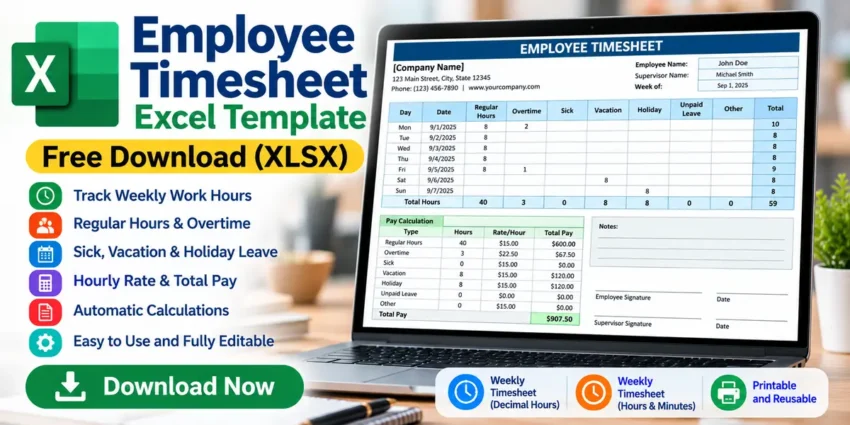
Tracking employee working hours accurately is important for businesses of all sizes. Whether you manage a small business, office, team, or group of hourly workers, keeping clear records of regular hours, overtime, leave, and pay can make employee management much easier.
Our free Employee Timesheet Excel Template provides a simple way to record weekly employee hours using Microsoft Excel. The editable XLSX spreadsheet includes sections for regular hours, overtime, sick leave, vacation, holidays, unpaid leave, hourly rates, and total pay.
The workbook also includes automatic formulas, helping you calculate weekly hours and basic employee pay without manually adding every figure.
Download Employee Timesheet Excel Template
This template is provided in XLSX format and can be customized according to your business requirements.
Download Employee Timesheet Excel TemplateFile Format: XLSX
Template Type: Weekly Employee Timesheet
Editable: Yes
Automatic Calculations: Yes
Software: Microsoft Excel or compatible spreadsheet software
What Is an Employee Timesheet?
An employee timesheet is used to record the amount of time an employee works during a specific period.
Weekly timesheets are commonly used to record working hours from one week to the next. Businesses can use this information for attendance records, overtime monitoring, payroll preparation, and leave management.
Instead of maintaining these records manually, an Employee Timesheet Excel Template can perform many calculations automatically.
This can save time and make weekly employee records easier to organize.
What’s Included in This Excel Timesheet?
This Excel workbook provides a structured weekly timesheet with fields for employee and company information.
You can enter details such as:
- Company name
- Company address
- Employee name
- Supervisor name
- Reporting week
- Daily working hours
The timesheet then provides separate columns for different types of hours.
Track Regular Working Hours
The Regular Hours section can be used to record an employee’s normal working time for each day.
For example, if an employee works eight regular hours Monday through Friday, the spreadsheet can calculate a weekly total of 40 regular hours.
Because formulas are included in the workbook, you don’t need to manually add every day’s working hours.
Track Employee Overtime
The template includes a separate Overtime column.
This makes it possible to keep overtime hours separate from regular working hours.
For example:
Regular Hours: 40
Overtime Hours: 5
Different hourly rates can also be entered for regular and overtime hours when appropriate.
This feature can be particularly useful for businesses with hourly employees.
Track Sick Leave, Vacation and Holidays
Employee working time isn’t the only information that may need to be recorded.
This template provides separate columns for:
- Sick
- Vacation
- Holiday
- Unpaid Leave
- Other
Keeping these categories separate provides a clearer picture of an employee’s weekly attendance and leave.
The Other category can also be adapted for another type of time used by your organization.
Decimal Hours and Hours:Minutes Formats
The workbook provides two weekly timesheet formats.
One worksheet can be used for decimal-hour entries, while another supports an hours and minutes (h:mm) format.
For example:
8 can represent eight hours in the standard weekly sheet.
The h:mm version can represent values such as:
8:30 for eight hours and thirty minutes.
This gives businesses more flexibility when choosing how employee time should be entered.
Automatic Weekly Hour Calculations
The Employee Timesheet Excel Template includes formulas that automatically calculate daily and weekly totals.
After entering employee hours, you can review totals for:
- Regular hours
- Overtime
- Sick leave
- Vacation
- Holiday
- Unpaid leave
- Other hours
- Total weekly hours
Automatic calculations can reduce repetitive manual work, although all figures should still be checked for accuracy.
Hourly Rate and Total Pay
The template also includes Rate/Hour and Total Pay sections.
Hourly rates can be entered for applicable categories. Excel then uses the entered hours and rates to calculate basic pay amounts.
For example:
| Type | Hours | Rate |
|---|---|---|
| Regular | 40 | $15 |
| Overtime | 5 | $22.50 |
| Vacation | 8 | $15 |
This can make the spreadsheet useful for both employee time tracking and basic payroll calculations.
However, actual payroll may involve additional items such as taxes, deductions, benefits, bonuses, and jurisdiction-specific overtime rules. Verify all calculations before using them for employee payments.
How to Use the Employee Timesheet Excel Template
Using the spreadsheet is simple.
First, download the XLSX file and open it in Microsoft Excel.
Choose the weekly worksheet format that best suits your needs. Then enter your company name, employee name, supervisor, and reporting week.
Enter the employee’s daily hours under the appropriate categories, such as Regular, Overtime, Sick, Vacation, or Holiday.
Next, update the applicable hourly rates.
Excel will calculate the relevant totals using the formulas included in the workbook.
Before using the results for payroll, review the daily hours, weekly totals, hourly rates, and calculated pay carefully.
Why Use an Excel Employee Timesheet?
An Excel timesheet can be a practical solution for businesses that don’t need a complex employee time-management system.
Some key benefits include:
- Easy weekly time tracking
- Automatic hour calculations
- Separate overtime tracking
- Sick and vacation tracking
- Holiday and unpaid leave records
- Editable hourly rates
- Basic pay calculations
- Reusable weekly format
- Printable employee records
- Easy customization
Because it is an Excel workbook, you can also customize the spreadsheet according to your organization’s requirements.
Who Can Use This Template?
This free timesheet template can be useful for small businesses, offices, contractors, supervisors, HR staff, accountants, payroll staff, freelancers, and organizations.
It can also be useful for businesses moving from paper-based timesheets to a simple digital system.
Frequently Asked Questions
Is the Employee Timesheet Excel Template free?
Yes. The template can be offered as a free XLSX download if you have the necessary rights to distribute the file.
Does it calculate weekly hours automatically?
Yes. Built-in Excel formulas calculate daily and weekly totals based on the hours entered.
Can I track overtime?
Yes. Overtime has a separate column and can have a different hourly rate.
Can I track employee leave?
Yes. The spreadsheet includes Sick, Vacation, Holiday, Unpaid Leave, and Other categories.
Does the template calculate employee pay?
The workbook includes hourly-rate and basic Total Pay calculations. More complex payroll items may need to be handled separately.
Can I edit the template?
Yes. The XLSX spreadsheet is editable and can be customized for your business.
Download Free Employee Timesheet Excel Template
The free Employee Timesheet Excel Template provides an easy way to organize weekly employee hours, overtime, leave, hourly rates, and basic pay calculations in Microsoft Excel.
Download the XLSX template, customize your company and employee information, and start tracking weekly working hours.
Download Employee Timesheet Excel Template