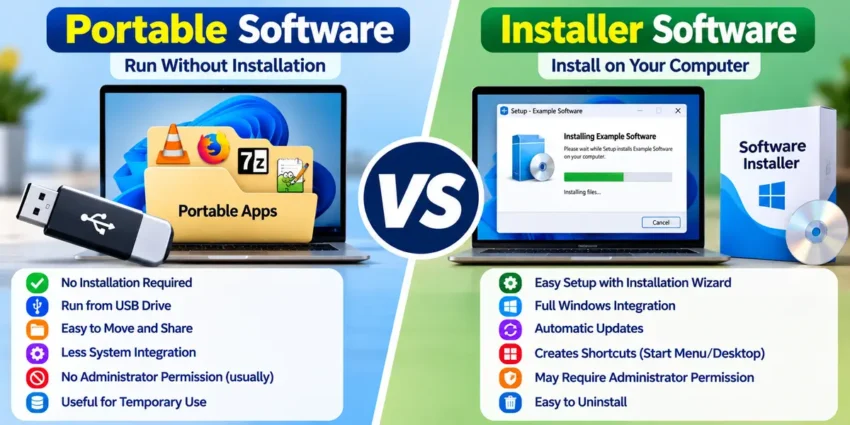
When downloading software for Windows, you may notice that some applications are available in two versions: Portable and Installer. Although both versions may provide similar features, they work differently when it comes to installation, storage, updates, and system integration.
Understanding the difference between Portable vs Installer Software can help you choose the right version for your computer.
In this guide, we’ll explain how portable and installer software work, compare their advantages and disadvantages, and help you decide which option is better for Windows 10 and Windows 11.
What Is Portable Software?
Portable software is an application designed to run without requiring a traditional installation process.
Instead of running a setup wizard, users typically download a ZIP file, extract its contents, and launch the application’s executable file.
Portable applications can often run directly from a USB flash drive, external SSD, or computer folder.
Advantages of Portable Software
- No traditional installation: Many portable applications run directly after extraction.
- Easy to transfer: Applications can be moved between compatible computers.
- USB-friendly: Suitable for carrying useful tools on removable storage.
- Less system integration: Portable applications often require fewer system-level changes.
- Convenient for temporary use: Useful when you don’t want a full installation.
However, portable software isn’t always completely self-contained. Some applications may still create temporary files, registry entries, or user settings outside their main folder.
What Is Installer Software?
Installer software is an application distributed with a setup program that installs the application on your computer.
Common Windows installer formats include .exe and .msi.
During installation, the setup program may copy files into system directories, create shortcuts, register components, and configure application settings.
Some installers also add uninstall entries to Windows Settings.
Advantages of Installer Software
- Easy setup: Installation wizards guide users through configuration.
- Windows integration: Applications can create Start menu shortcuts and file associations.
- Automatic updates: Many installed applications support built-in update mechanisms.
- System features: Some applications can install required services, drivers, or components.
- Convenient daily use: Installed applications are generally easier to find and manage.
Installer software is often the preferred choice for applications that you use regularly.
Portable vs Installer Software: Key Differences
The following table compares the two software types.
| Feature | Portable Software | Installer Software |
|---|---|---|
| Installation | Usually not required | Usually required |
| Setup process | Extract and run | Run setup wizard |
| USB drive usage | Often supported | Usually not designed for it |
| System integration | Generally limited | Often extensive |
| Windows shortcuts | Usually manual | Often automatic |
| Automatic updates | Depends on application | Commonly available |
| Administrator permission | Often unnecessary | Sometimes required |
| Moving between PCs | Often easier | May require reinstallation |
| Uninstallation | Often delete application folder | Usually use an uninstaller |
| Performance | Generally similar | Generally similar |
The actual differences depend on how the software developer packages the application.
Does Portable Software Run Faster Than Installer Software?
One common question is whether portable software performs better than installed software.
Portable software is not automatically faster.
If both versions use the same application components, their performance may be nearly identical.
Performance mainly depends on factors such as:
- CPU and RAM
- Storage speed
- Application design
- Background processes
- Available system resources
For example, a portable application running from a slow USB drive may launch more slowly than an installed version running from a fast SSD.
Therefore, you should choose software based on features and compatibility rather than assuming the portable version will always be faster.
Is Portable Software Safer Than Installer Software?
Both portable and installer software can be safe when downloaded from trusted sources.
However, neither format guarantees security.
Portable applications can contain malware, while installer packages can also include malicious components.
To reduce security risks:
- Download software from official developer websites.
- Avoid modified or cracked applications.
- Scan unfamiliar downloads using Windows Security.
- Keep applications updated.
- Check the publisher and digital signature when available.
You should also avoid downloading executable files from unknown websites.
Important: Portable software is not necessarily safer simply because it doesn’t require installation.
Which Software Uses Less Storage Space?
Portable software may use less storage because it often avoids creating additional installation directories or system integration files.
However, this isn’t always the case.
Some portable applications contain all their dependencies in one folder, making their download size larger than an installer package.
Installed applications may also store configuration files, caches, and updates in separate Windows directories.
The actual storage requirements depend on the application rather than its distribution format alone.
Can Portable Software Run from a USB Drive?
Yes. Many portable applications are designed to run directly from USB flash drives or external storage devices.
This can be useful for students, technicians, IT professionals, and people who work on multiple computers.
For example, you can store portable utilities on a USB drive and launch them on compatible Windows computers.
However, some applications may require additional components, administrator permissions, or access to specific system resources.
USB portability also depends on the software’s licensing terms and compatibility.
How to Use Portable Software on Windows 11
Using portable software is usually straightforward.
1: Visit the official developer website.
2: Download the portable version if one is available.
3: Extract the downloaded ZIP archive.
4: Open the extracted folder.
5: Double-click the application’s executable file.
You can keep the application folder on your SSD, hard drive, or USB storage device.
Avoid deleting configuration files stored inside the portable application’s folder if you want to preserve its settings.
How to Install Software on Windows 11
Installer software usually follows a different process.
1: Download the official installer.
2: Double-click the .exe or .msi file.
3: Review the publisher information and installation options.
4: Follow the setup instructions.
5: Launch the application from the Start menu or desktop shortcut.
To remove installed software later, open Settings → Apps → Installed apps and select the application’s uninstall option when available.
Popular Examples of Portable Software
Several well-known applications have official portable versions or portable distributions.
Examples include:
- VLC Media Player: Portable distributions are available through PortableApps.com.
- Notepad++: Offers downloadable portable ZIP packages.
- 7-Zip: Portable packages are available through third-party portable application platforms.
- SumatraPDF: Offers portable versions for Windows.
Always confirm that the version you download is compatible with your Windows installation and comes from a trustworthy source.
When Should You Choose Portable Software?
Portable software is a good option when you:
- Frequently use different computers.
- Need applications on a USB drive.
- Want to avoid a traditional setup process.
- Use temporary troubleshooting tools.
- Prefer keeping certain application files together.
It can be especially useful for lightweight utilities and diagnostic applications.
When Should You Choose Installer Software?
Installer software is generally better when you:
- Use the application every day.
- Need automatic updates.
- Want desktop and Start menu shortcuts.
- Require file associations or Windows integration.
- Use software that installs drivers or background services.
For most everyday Windows users, the official installer version is often the more convenient choice.
Frequently Asked Questions
Is portable software better than installed software?
Not necessarily. Portable software offers convenience and flexibility, while installed software often provides better system integration. The best choice depends on your requirements.
Does portable software require administrator permission?
Many portable applications don’t require administrator permission, but some do when accessing protected system resources.
Can portable software be installed permanently?
Portable applications can often be stored permanently in a computer folder and launched whenever needed. They don’t necessarily require a traditional installation.
Does portable software work on Windows 11?
Many portable applications support Windows 11. Always check the developer’s compatibility information before downloading.
Can I delete portable software without uninstalling it?
Usually, yes. However, some applications may store settings, caches, or other files outside their main folder.
Final Verdict: Portable vs Installer Software
The choice between Portable vs Installer Software depends on how you plan to use the application.
Portable software is convenient for USB drives, temporary tasks, and working across multiple computers. Installer software is generally more suitable for everyday applications that benefit from Windows integration and automatic updates.
Neither format is universally faster, safer, or better.
For the best experience, download the official version that matches your needs, keep your applications updated, and avoid untrusted software sources.