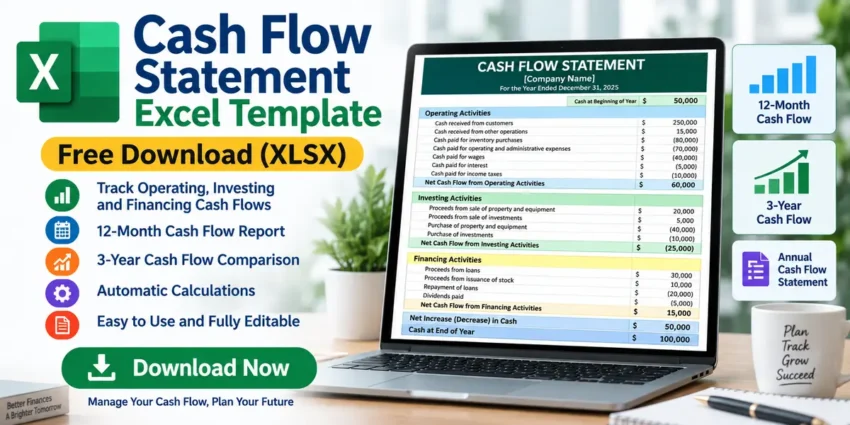
Managing cash effectively is an important part of running any business. Knowing how much money is coming into your business, where it is being spent, and how much cash remains at the end of a period can help you understand your financial position.
Our free Cash Flow Statement Excel Template provides an easy way to organize and track cash inflows and outflows using Microsoft Excel.
This editable XLSX workbook includes annual, 3-year, and 12-month cash flow worksheets. It also contains built-in formulas for calculating operating, investing, and financing cash flows, as well as net changes in cash and ending cash balances.
Whether you are a small business owner, accountant, bookkeeper, student, or freelancer, this Excel template can provide a useful starting point for cash flow tracking.
Free Download Cash Flow Statement Excel Template
Download the editable XLSX file and customize it with your own financial information.
File Format: XLSX
Template Type: Cash Flow Statement
Worksheets: 3
Editable: Yes
Built-in Formulas: Yes
Recommended Software: Microsoft Excel or compatible spreadsheet software
What Is a Cash Flow Statement?
A cash flow statement is a financial report that shows how cash moves into and out of a business during a particular period.
It helps businesses understand where cash comes from and how it is being used.
Cash flow is generally divided into three main categories:
- Operating Activities
- Investing Activities
- Financing Activities
A simplified formula is:
Net Cash Flow = Operating Cash Flow + Investing Cash Flow + Financing Cash Flow
The ending cash balance can then be calculated as:
Ending Cash = Beginning Cash + Net Change in Cash
A spreadsheet can make these calculations easier by automatically updating totals when financial figures are entered.
What’s Included in This Excel Template?
This Cash Flow Statement Excel Template contains three worksheets designed for different reporting periods.
1. Annual Cash Flow Statement
The CashFlowStatement worksheet provides an annual overview of the company’s cash movements.
It includes sections for:
- Cash at Beginning of Year
- Operating Activities
- Investing Activities
- Financing Activities
- Net Increase in Cash
- Cash at End of Year
Built-in formulas calculate the results based on the figures entered into the spreadsheet.
This worksheet is useful when you want a simple overview of cash movement for an entire financial year.
2. 3-Year Cash Flow Statement
The 3YearCashFlow worksheet allows you to compare cash flow across three consecutive years.
It includes the same major cash-flow categories but places the years side by side.
This can make it easier to identify longer-term financial trends.
For example, you may be able to see whether:
- Customer receipts are increasing
- Operating costs are rising
- Equipment purchases are increasing
- Loan repayments are changing
- Ending cash balances are improving
A multi-year comparison can be especially useful for business planning and financial analysis.
3. 12-Month Cash Flow Statement
The 12MonthCashFlow worksheet provides more detailed month-by-month cash tracking.
Instead of looking only at annual totals, you can analyze how cash changes throughout the year.
This can help identify:
- Seasonal sales patterns
- Months with high expenses
- Periods of low cash
- Large investment payments
- Loan repayment periods
- Potential cash shortages
The spreadsheet also uses formulas to carry cash balances between reporting periods.
Operating Activities
Operating Activities represent cash flows related to normal business operations.
The template provides areas for cash receipts from:
- Customers
- Other operations
It also includes cash payments for items such as:
- Inventory purchases
- General operating and administrative expenses
- Wage expenses
- Interest
- Income taxes
After entering these figures, Excel calculates:
Net Cash Flow from Operations
Positive operating cash flow generally means the company’s normal operations generated more cash than they consumed during that period.
Investing Activities
The Investing Activities section tracks cash related to investments and longer-term assets.
The template includes cash receipts from:
- Sale of property and equipment
- Collection of principal on loans
- Sale of investment securities
It also provides areas for cash paid for:
- Purchase of property and equipment
- Making loans to other entities
- Purchase of investment securities
Excel then calculates:
Net Cash Flow from Investing Activities
Negative investing cash flow does not necessarily indicate a problem. For example, a growing company may spend significant cash purchasing new equipment.
Financing Activities
The Financing Activities section tracks cash associated with financing the business.
Cash receipts may include:
- Issuance of stock
- Borrowing
Cash payments can include:
- Repurchase of stock
- Repayment of loans
- Dividends
The spreadsheet uses these figures to calculate:
Net Cash Flow from Financing Activities
This section can help you understand how borrowing, debt repayment, and owner-related financing affect the company’s cash balance.
Automatic Cash Flow Calculations
A major benefit of using this Excel template is the built-in formulas.
For example, suppose a business has:
| Activity | Amount |
|---|---|
| Operating Cash Flow | $50,000 |
| Investing Cash Flow | -$15,000 |
| Financing Cash Flow | -$10,000 |
The net change in cash would be:
$50,000 – $15,000 – $10,000 = $25,000
If the business started with $20,000 in cash:
Ending Cash = $20,000 + $25,000 = $45,000
The spreadsheet can perform these calculations automatically based on the values entered.
How to Use the Cash Flow Statement Excel Template
Using the template is straightforward.
Step 1: Download the Excel File
Click the download button and save the XLSX file to your computer.
Step 2: Open the Spreadsheet
Open the file in Microsoft Excel or another compatible spreadsheet application.
Step 3: Enter Your Company Name
Replace the [Company Name] placeholder with your actual business or organization name.
Step 4: Select the Appropriate Worksheet
Choose between:
CashFlowStatement – Annual report
3YearCashFlow – Three-year comparison
12MonthCashFlow – Monthly tracking
Step 5: Enter Beginning Cash
Enter the amount of cash available at the beginning of the reporting period.
Step 6: Enter Cash Receipts and Payments
Enter your actual financial information under operating, investing, and financing activities.
Step 7: Review the Results
Check the calculated:
- Net Operating Cash Flow
- Net Investing Cash Flow
- Net Financing Cash Flow
- Net Increase in Cash
- Ending Cash Balance
Always verify that your figures and formulas are correct before using the spreadsheet for financial reporting.
Cash Flow Statement vs Income Statement
A cash flow statement and income statement provide different financial information.
| Cash Flow Statement | Income Statement |
|---|---|
| Tracks cash movement | Tracks revenue and expenses |
| Shows cash inflows/outflows | Shows profit or loss |
| Includes investing activities | Includes business expenses |
| Includes financing activities | Includes business revenue |
| Focuses on liquidity | Focuses on profitability |
Looking for a profit and loss spreadsheet? Download our Free Income Statement Excel Template to organize business revenue, expenses, and net income.
Cash Flow Statement vs Balance Sheet
A balance sheet shows the financial position of a business at a specific point in time.
It typically contains:
Assets = Liabilities + Equity
A cash flow statement instead explains how the business’s cash changed during a particular period.
Add an internal link:
You can also download our Free Balance Sheet Excel Template to organize assets, liabilities, and equity.
Connecting these articles gives your site a useful accounting-template content cluster:
Balance Sheet → Income Statement → Cash Flow Statement → Invoice Template
Benefits of This Cash Flow Excel Template
This template can help you:
- Track cash receipts and payments
- Monitor operating cash flow
- Record investing activities
- Record financing activities
- Calculate net cash flow
- Monitor beginning and ending cash
- Compare three financial years
- Track cash month by month
- Reduce repetitive calculations
- Customize financial categories
Because the workbook is editable, you can modify it according to your business requirements.
Frequently Asked Questions
Is this Cash Flow Statement Excel Template free?
Yes. The template can be provided as a free downloadable XLSX resource if you have the rights to distribute the file.
How many worksheets are included?
The workbook contains three worksheets: CashFlowStatement, 3YearCashFlow, and 12MonthCashFlow.
Does it calculate cash flow automatically?
Yes. The workbook contains formulas for calculating operating, investing, financing, net, and ending cash figures.
Can I track cash flow monthly?
Yes. The 12MonthCashFlow worksheet is designed for month-by-month cash flow tracking.
Can I compare multiple years?
Yes. The 3YearCashFlow worksheet allows three years of financial information to be compared.
Can I customize the template?
Yes. You can modify the company name, dates, financial values, and categories. If you change rows or columns, check that the formulas still reference the correct cells.
Can I open the template in Google Sheets?
XLSX files can generally be imported into Google Sheets, although you should verify formulas and formatting after importing.
Download Free Cash Flow Statement Excel Template
This free Cash Flow Statement Excel Template provides annual, monthly, and three-year reporting options in one editable workbook.
Use it to organize operating, investing, and financing activities and monitor how your business’s cash position changes over time.
Before using any spreadsheet for official financial, tax, or regulatory reporting, verify the figures, formulas, and applicable accounting requirements.